Customizable Standard Software Meets AI
by Alexander Huber
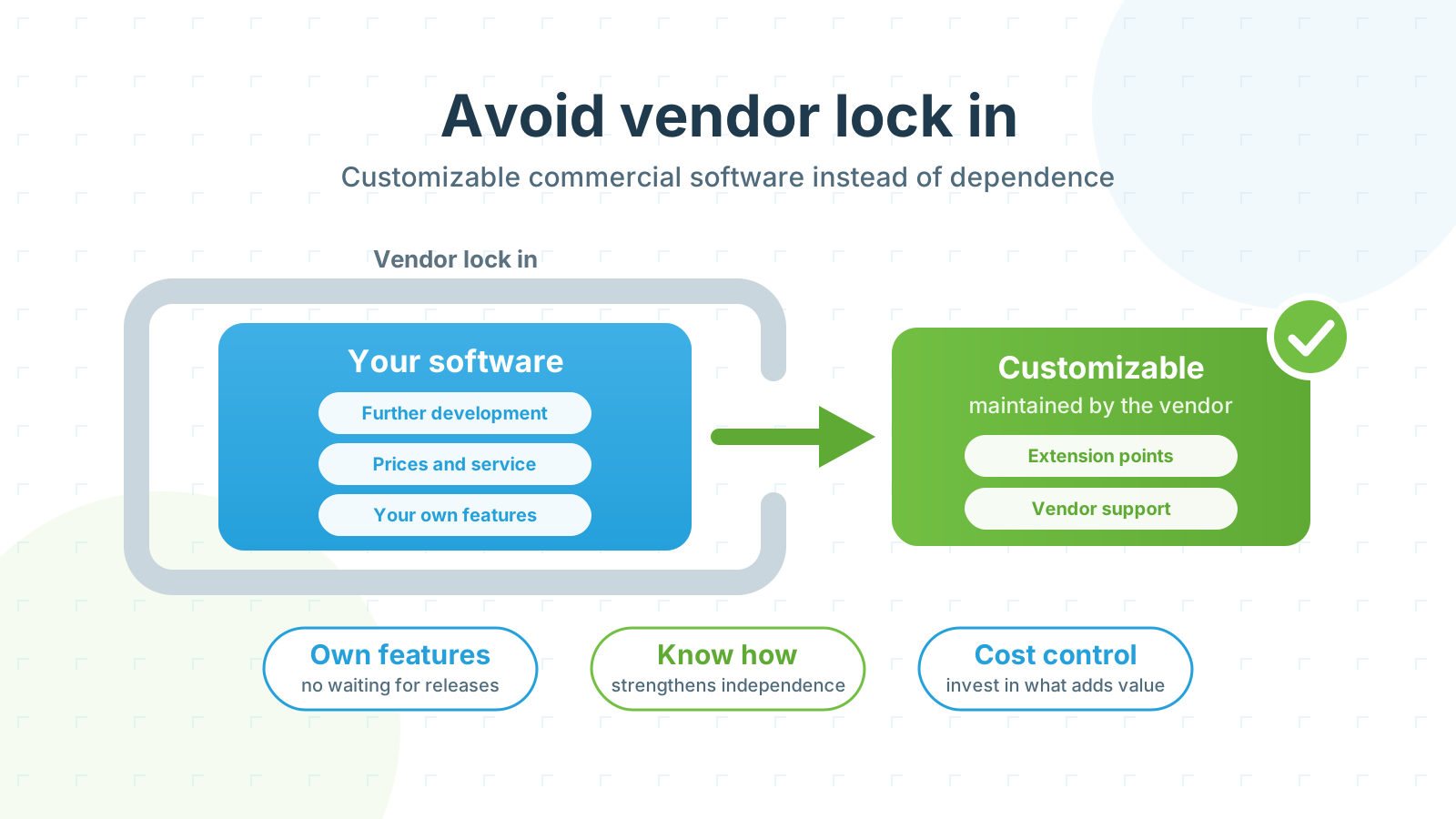
Standard software works well as long as a company’s process matches the intended standard. Things become difficult when a specific requirement arises. Certain time entries might need approval by the project manager first and, above a defined threshold, additional approval by executive management. If the software does not support this workflow, the company must change its process, wait for a new product feature, or develop and maintain a custom solution.
The fundamental answer is a customizable data model. In time cockpit, customers can use the OnCockpitAdmin to add their own fields, relationships, rules, lists, forms, and permissions. The missing approval workflow becomes an additional status, the appropriate roles, a list of open cases, and an approval action. The standard product core remains intact, and no separate version of time cockpit has to be compiled.
Until now, this capability has primarily been accessible to people who understand the data model, TCQL, and the scripting environment. AI can lower this barrier. Based on a functional description, it can create an initial proposal for a model change, validation rule, query, list, and business logic. The data model, TCQL, scripting environment, and sandbox provide a clear path for implementing and verifying the change.
There are many ways to integrate AI and LLMs into a product: assistants in the user interface, natural-language queries, generated code, or new access paths through MCP. Initially, we were not sure which ideas would create real value in day-to-day work and which would mainly look good in a demo. We found a concrete starting point where AI does not appear as an isolated feature but supports the existing customization process.
Not every proposal was immediately production-ready, and functional review remains essential. What mattered to us was something else: AI did not have to reinvent time cockpit. The data model, TCQL, scripting language, and tools already provided a defined path for describing, implementing, and verifying functional changes. This is why we believe customizable standard software and AI work so well together.
Why speed alone is not enough
AI can generate code very quickly. That does not mean it knows what a billable project, an approved time entry, or an acceptable exception means in a specific company. This meaning lives in the business system: in data structures, relationships, rules, permissions, and existing workflows.
The advantage therefore goes beyond speed. The customer-specific data model contains the functional relationships. TCQL, the scripting language, OnCockpitAdmin, and the sandbox define how a customization is implemented and tested. On this basis, AI can create an initial working proposal more quickly. The customer does not have to become the vendor of a separate software version. We discuss this long-term responsibility in more detail in Build Your Own Time Tracking Software with AI.
Five building blocks that make the difference together
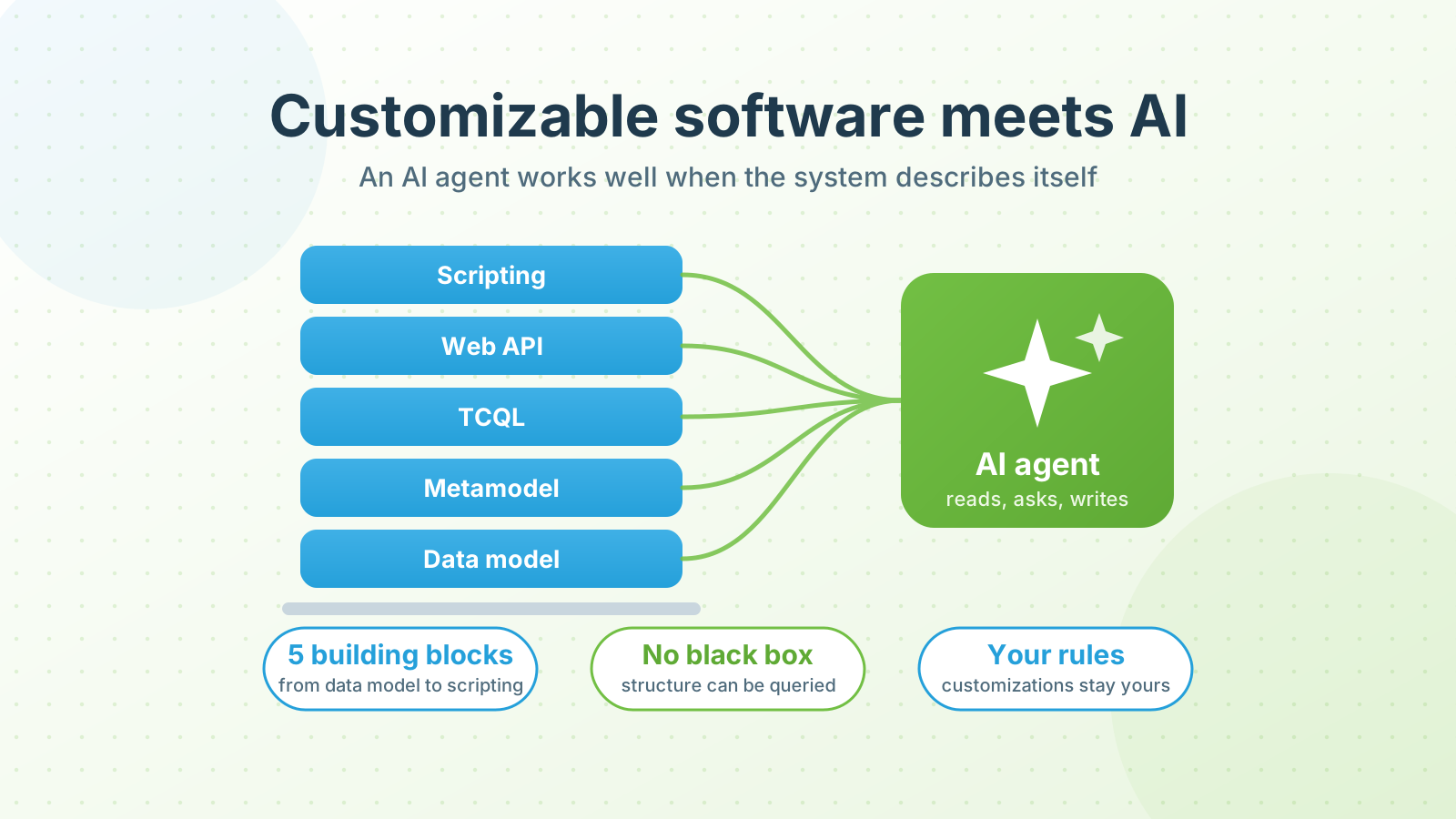
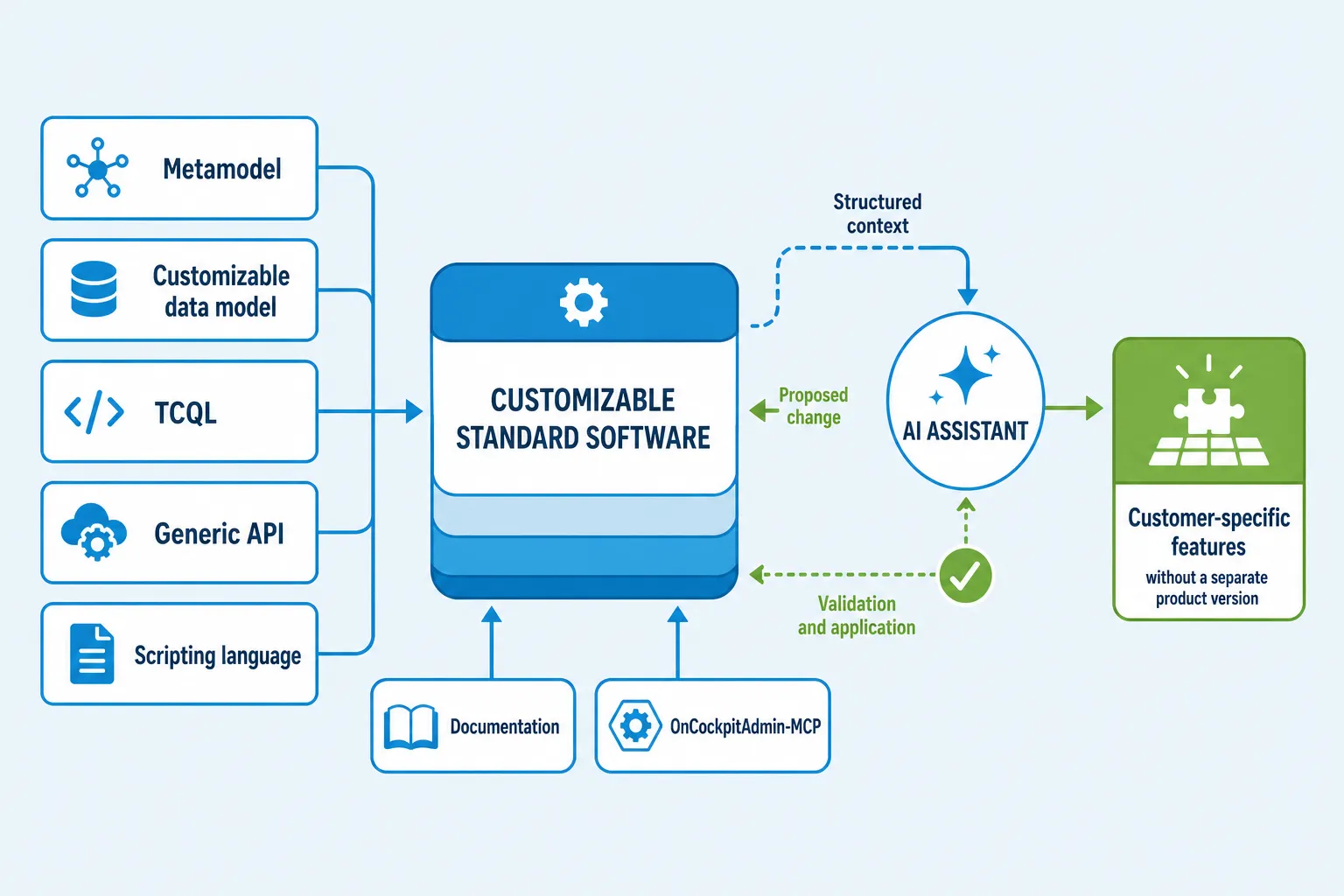
In time cockpit, five building blocks work together. Each one solves a specific problem.
1. The metamodel describes how time cockpit is structured
The metamodel is the shared grammar of the system. It describes what an entity, property, relationship, validation rule, permission, list, or form is.
The practical consequence is that many parts of the application are not fixed in program code. They can be read and changed as structured information. An AI agent therefore does not have to guess how an extension works in principle. The system describes its own structure.
2. The customizable data model reflects the customer’s language
The data model turns general building blocks into concrete business concepts. A customer might add a project type, cost center, approval status, or relationship to a framework agreement. Calculated properties, required fields, rules, and permissions can be added as well.
This enables time tracking to understand the relationships that actually matter for billing and project controlling. When the organization or business model changes, the model can grow with it.
3. TCQL makes the model queryable
TCQL is time cockpit’s query and expression language. It follows relationships in the data model and is used for more than lists. Calculations, validation rules, conditions, and parts of the permission system also build on it.
For the two-stage approval workflow, TCQL could determine which time entries are still waiting for approval, when executive management is additionally responsible, and which users may view or approve the respective entries. The same functional relationships are then available in lists, validations, and reports.
This is valuable for AI because a generated query does not target unknown tables and arbitrary column names. It works against a described model with functional relationships.
4. The generic API grows with the model
The time cockpit Web API follows the data model. New customer-specific entities and properties can be read and modified through the same access path as existing structures. The OData endpoint exposes the model and its data, including individual data model extensions. A TCQL Query Endpoint is also available for more complex queries.
A customer can make additional project information available for reporting or import data from an upstream system without waiting for a dedicated product API for every new field. Permissions remain part of the system.
5. The scripting language defines extensions and executes business logic
The integrated scripting language is based on IronPython. The name of the language is not the core advantage. What matters are its two roles.
First, it is a definition language. Scripts can dynamically extend the data model with entities, properties, relationships, and validation rules. Lists, forms, actions, and other model elements can also be registered reproducibly. Second, it contains customer-specific business logic, for example for approvals, integrations, actions, or batch processes. The scripting documentation describes these use cases and how scripts work with the data context.
This dual role is particularly useful for an LLM. With documentation and targeted Skills, it understands not only the syntax of the language but also the patterns of a valid time cockpit customization. From a functional requirement, it can create a draft that defines the required fields, relationships, and rules and also contains the corresponding business logic.
Through the OnCockpitAdmin MCP, an AI agent can read the actual customer model, apply the draft in a sandbox, and evaluate feedback from the system. If a referenced property does not exist or the model change is invalid, the agent can revise the proposal. People still review the functional correctness and decide whether to adopt the customization.
For the approval workflow, a script therefore defines more than a program flow. It can create the required status fields, relationships, and rules and also implement the action through which the project manager or executive management approves the relevant time entries.
These changes are applied to the customer tenant without recompiling the time cockpit product core or deploying a separate version. Customizations remain traceable as code, can be versioned, and can be transferred between test and production environments. IronPython can access objects and libraries from the .NET Framework (IronPython).
What customers do with it and what we do with it
Customers add their own project attributes, approval processes, contract information, reports, or integrations. The software follows the actual workflow and can remain familiar when new requirements emerge. This can often avoid a product change with data migration and user training.
We use the same mechanisms in product development and customer projects. A new idea can begin as a model change, TCQL query, list, and script. Working with real data and permissions quickly shows whether the functional assumption holds. We then decide which parts should remain customer-specific and which should become a maintainable standard feature in the product core.
AI shortens both paths. A customer or consultant can describe a requirement in business terms. An AI agent can derive an initial proposal for the change. Our development team can test variants faster and then move the viable solution cleanly into the product.
The OnCockpitAdmin MCP closes the gap between knowledge and execution
For AI to produce more than plausible scripts, it needs controlled access to the actual system. This is where our OnCockpitAdmin MCP comes in. It is an internal development tool that extends OnCockpitAdmin with tools for AI agents.
Through it, an agent can read the existing data model, apply a customization, create test data, and verify the result. Instead of working from a long prompt alone, the agent receives feedback from the system: Does the referenced entity exist? Is the model valid? Does the list work with realistic data? Do the intended rules take effect?
This is where the combination becomes practical for AI. The metamodel provides the map, the customer model supplies the functional context, TCQL provides the queries, the scripting language provides definitions and logic, and the OnCockpitAdmin MCP enables controlled execution and verification.
Documentation becomes executable context
An AI agent can only work effectively with these building blocks if their use is documented. We therefore explain, for example, how lists are constructed, how relationships are queried, and how scripts work with the data context.
We publish this knowledge in our documentation. Services such as Context7 can index the content and make it available to AI tools when needed. Context7 is designed to retrieve current technical documentation and add the relevant sections to a coding agent’s working context (Context7).
This creates an end-to-end chain. The documentation explains correct usage. The agent reads the model and its rules. It generates a customization. The OnCockpitAdmin MCP applies it in a controlled environment. Tests and human review determine whether it is adopted.
Conclusion: The advantage lies in the combination
For us, AI time tracking does not begin with a chatbot. It begins with software that can express its domain knowledge in a structured way.
Five elements work together in time cockpit: metamodel, customizable data model, TCQL, generic API, and scripting language. Documentation and the OnCockpitAdmin MCP make this knowledge discoverable and controllable for AI.
For customers, this means faster, better-fitting extensions without a separate product version. We can develop ideas closer to real use cases and deliberately move successful solutions into the standard product. Other product teams can use this perspective to assess how clearly their product describes, supports, and delivers customizations in a controlled way.
If you want to map your own project, billing, or time tracking processes, we would be happy to show you how customizable time tracking in time cockpit can support them.