Claude, ChatGPT or Copilot with time cockpit: What Your Own AI Assistant Brings
by Alexander Huber
time cockpit is now in your AI assistant
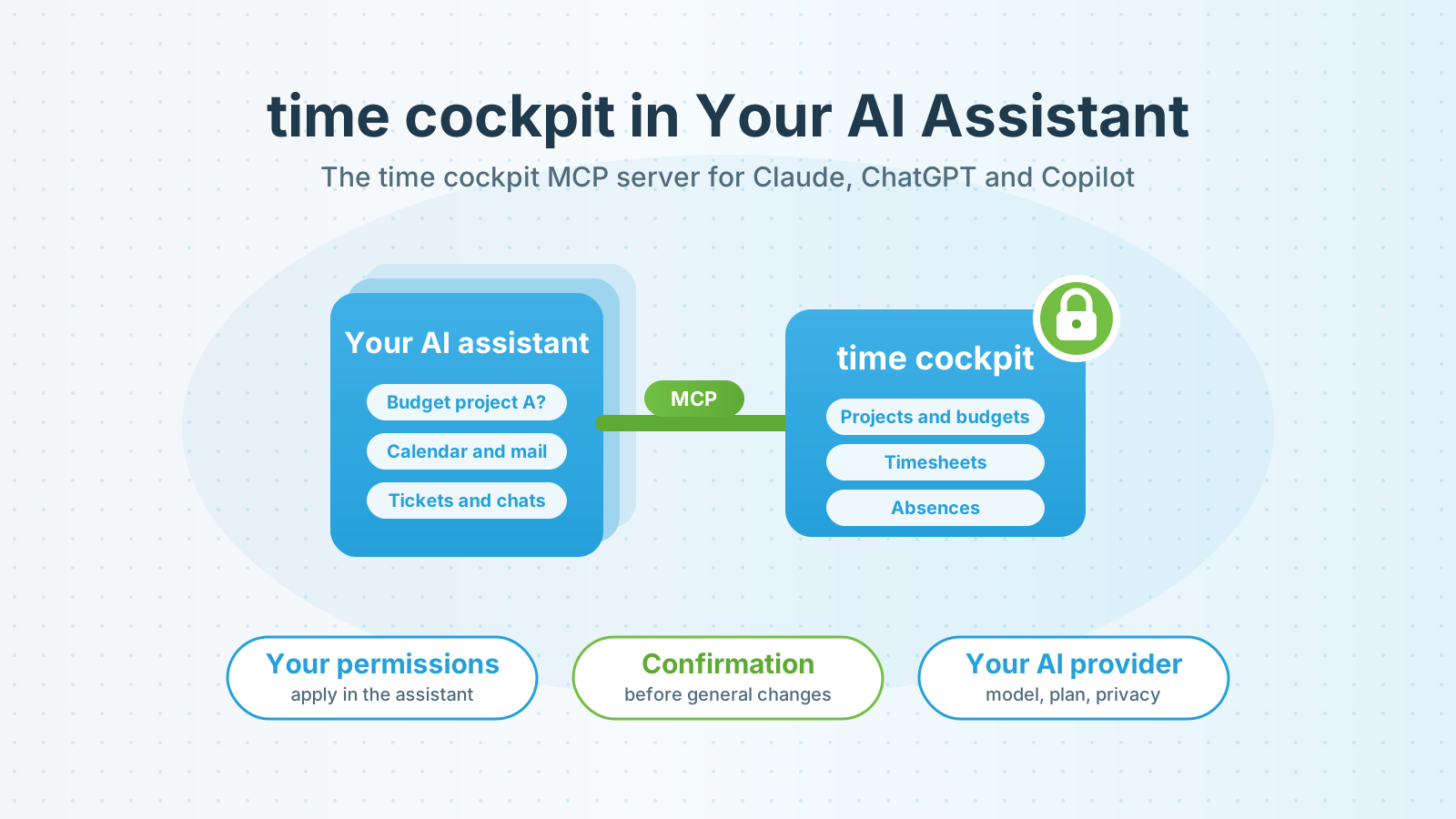
The MCP server for AI assistants is now available. It lets you ask Claude, ChatGPT, Copilot or Codex directly about project budgets, open timesheets, utilization or remaining vacation. The answers come from your time cockpit data, with exactly the permissions you have in time cockpit. The server is included in all plans and is currently in public preview.
What an MCP server is and which use cases it opens up for project data is covered in MCP Server for Time Tracking. This post is about something else: what you gain from having time cockpit in your own assistant, how we use it in our team and why we did not build a chat of our own first.
What you gain when time cockpit is in your own assistant
You work where you already work. AI is part of everyday work in many companies. According to Eurostat, 20.0% of EU enterprises with at least ten employees used AI technologies in 2025, up from 13.5% the year before (Eurostat). If you already use Claude, ChatGPT or Copilot every day, you do not need to open another tool for project questions. That access through the familiar assistant is what makes the difference is also shown by a customer’s Power BI example.
time cockpit is not alone. Your own assistant also has your calendar, mail, tickets or last week’s chats. Many questions only become interesting in combination, for example whether the hours you booked match what you actually worked on, or which meetings next week concern a project with a tight budget.
You choose model, provider and privacy. You decide which AI provider processes your data, on which plan and with which settings for retention and model training. Many companies have already cleared these questions for their provider with data protection and compliance. time cockpit fits into that decision instead of forcing a second one.
Your assistant can do more than answer. Current assistants turn data into tables, files or interactive dashboards. A question about budget consumption becomes a dashboard with filters in Claude for the next project meeting, or an HTML or Excel file in other assistants.
The rules stay with time cockpit. Whichever assistant is asking: every person signs in with their own Microsoft Entra account, and their time cockpit permissions apply. The server carries out general data changes only after an explicit confirmation that the assistant cannot switch off. The details are on the MCP server for AI assistants page.
How we use the MCP server ourselves
We use the server in our own team every day, and that is where most ideas came from. Three examples:
- Deriving timesheets from chats. At the end of the week the assistant receives the export of our own Claude chats, derives possible activities and compares them with the existing bookings. It proposes bookings for whatever is missing. Nothing is created without approval.
- Budget dashboard before a customer meeting. Before a project meeting the assistant compiles the budget consumption per project and task and turns it into an interactive dashboard.
- Gaps and vacation. Missing daily entries, overlaps or remaining vacation become a question instead of a search through lists. The assistant creates a vacation entry itself after asking.
Why we did not build a chat of our own first
The obvious move would have been a chat window built into time cockpit. For the first step we deliberately decided against it, for three reasons.
First, our customers already work in their own assistant. A chat inside time cockpit would have been one more window with one more model, without access to calendar, mail or tickets.
Second, a chat of our own would have made us the operator of a language model. We would have had to carry and price model costs and would have been responsible for processing the conversation content ourselves. With MCP, provider, plan and privacy settings stay with the customer.
Third, a chat window does not answer the hard questions. Permissions, confirmation and limits have to be handled by the interface anyway, whatever user interface sits in front of it. The MCP specification, for example, requires a server to accept only access tokens issued for it and not to pass them on to other services (MCP Authorization). Rules like these belong in the interface, not in a chat window. So that is where we started.
This does not rule out an assistant directly in time cockpit. Once we see how customers actually use AI day to day, we can make a sound decision about adding a user interface of our own. It would then build on the same foundation.
What you need to get started
Microsoft Entra ID is required. Your IT creates an app registration in your own Entra tenant once, and the license for the AI assistant comes from your provider. Clarify with data protection beforehand which settings your plan offers for retention and model training, because the data goes to the AI provider even on a read-only connection. Tested assistants, all setup steps and the settings for read only and own data only are on the MCP server for AI assistants page.
Conclusion: time cockpit comes to your assistant
With the MCP server you no longer need to open another tool for questions about projects, budgets and hours. You ask in the assistant you already use, combine time cockpit with your other sources and keep provider and privacy in your own hands. Your permissions always apply, and general changes require confirmation.
All supported tools and the way to set it up are on the MCP server for AI assistants page. We are happy to help with the setup together with your IT. Write to us at support@timecockpit.com, feedback from the preview is very welcome as well.