An Overview of the New time cockpit Pricing Model
by Alexander Huber
Introduction
People rarely start taking time tracking seriously out of curiosity. Most of the time there is a concrete trigger: working hours should become traceable, project effort should become more transparent, or evidence should no longer be reconstructed from memory.
We know this situation well. When we started professionalising our own processes about 15 years ago, the key question was not: “What is the best or nicest system?” Instead it was: “What helps us now, without overwhelming us?”
Based on exactly that experience, we adjusted our entry model at the beginning of December 2025. In this article, I explain what a free or very low cost start with time cockpit means in practice, who benefits from starting at low cost, and why “free” often becomes expensive faster than expected.
Free or low cost: time tracking for small businesses
In conversations with freelancers, startups, and small businesses, we repeatedly run into the same situation. You know time tracking will become important, but right now you lack time, budget, or the headspace to turn it into a separate project.
That is why the real question is rarely “Which tool is the best?” and more often: How can we start cleanly without committing financially or organisationally before we even know what we truly need?
Smaller businesses feel this pressure more strongly. Processes are still being built, roles keep changing, and nobody wants to spend money on something that still has to prove itself.
We designed our entry options for exactly this reality:
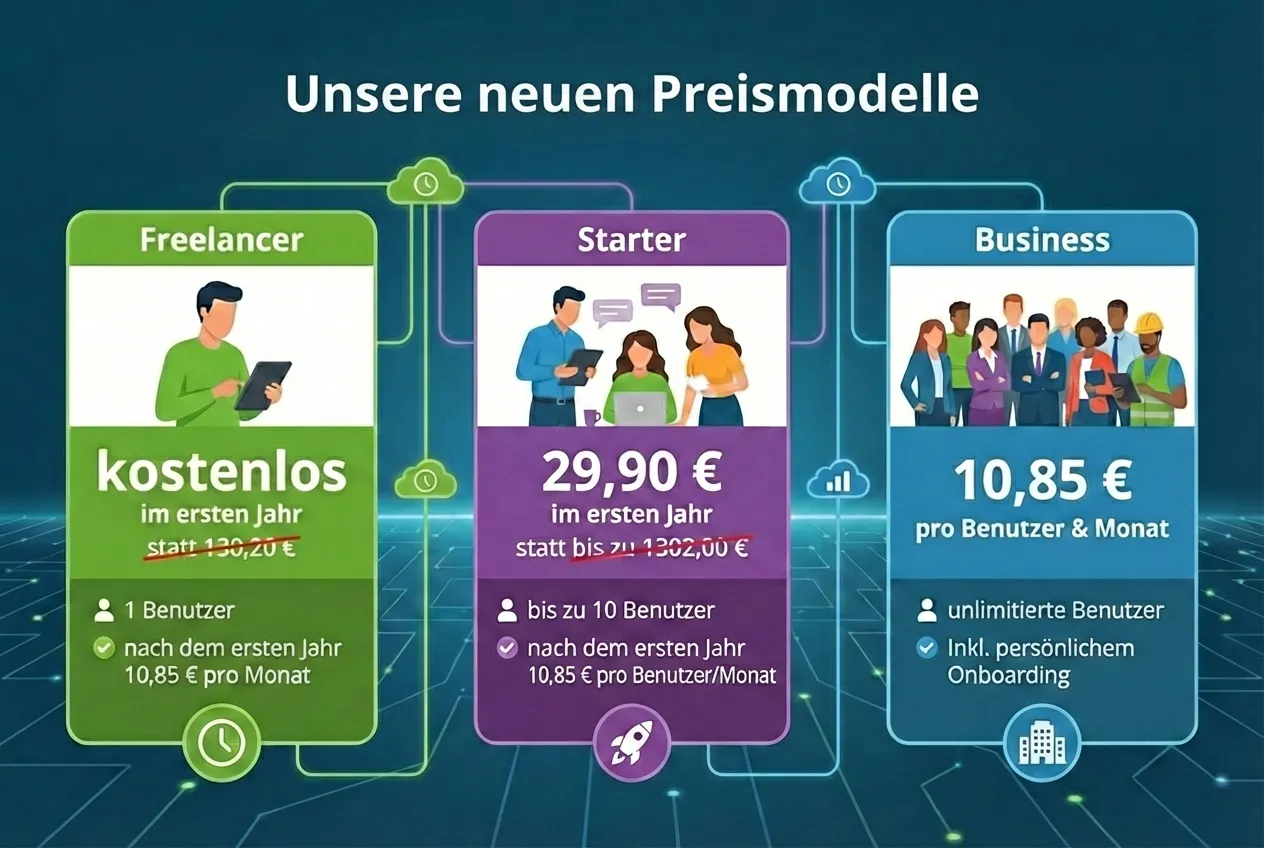
- Freelancers can use time cockpit for free for one year, without feature cuts and without artificial time pressure.
- Startups and small businesses with up to 10 employees pay a flat fee of 29 euros in the first year, not per person, but for the whole team.
The goal is deliberately simple: A start that does not feel risky, but enables real usage. Because only when time tracking works in daily work does its real value show.
We keep the current conditions up to date on the pricing page: Pricing
ℹ️ Practical tip: The best start is not the perfect process, it is a reliable rhythm. Time tracking works similar to bookkeeping. Its real value appears when it happens consistently.
Why time tracking is so important for small teams
Young companies and teams with up to about 30 employees are often stuck with an uncomfortable equation. You need to become more professional, but you must not slow down daily work.
Time tracking is a classic trigger topic because it can sound like control. In practice, however, it is mainly one thing: a foundation that prevents teams from growing into ambiguity, overload, and bad decisions.
From our experience, there are four typical triggers that suddenly make the topic urgent:
- Growth and dynamics Two projects today, five tomorrow. Everyone knows everything today, clear responsibilities and standards tomorrow.
- Evidence and reliability Customers, tax advisers, funding bodies, or internal reviews ask for numbers that are not based on gut feeling.
- Decisions need data Without reliable data, prioritisation quickly becomes an opinion contest, especially risky in small teams.
- Health and sustainability If nobody sees how much is actually worked, overload often becomes visible only when it is too late.
Legal framework and organisational reality
Note: This article does not constitute legal advice. It describes the framework in general terms.
- In Austria, the obligation to document working time is anchored in the Working Time Act (AZG), including section 26 AZG (RIS section 26 AZG).
- At EU level, the European Court of Justice emphasised that employers need an objective, reliable, and accessible system to record daily working time (Curia).
From our practice we see: time tracking is not only a legal duty, it is also an organisational tool. This is especially true where working time is highly flexible and workloads increase (BAuA).
A detailed look at why legal compliance matters even for small teams and startups is in: Time Tracking for Startups and Small Businesses.
More than working hours: transparency for projects and decisions
Many teams start with the idea of pure working time recording. The real benefit usually appears one step later.
Once time is recorded consistently, you can answer questions that previously were only guesses:
- Which projects consume the most capacity?
- Where does internal work appear that nobody planned?
- How much time goes into coordination, alignment, and administration?
This transparency does not only help with controlling. It also improves communication, externally with customers and internally with the team. Patterns become visible before they become real problems.
What we have learned in practice with time cockpit
Who benefits from starting for free
In our view, needs differ significantly.
Freelancers Here the main challenge is rarely complexity, it is consistency. Time tracking often acts like a memory aid, especially when projects change and offers or invoices are created in between.
Startups and small teams In teams up to ten people, growth often happens in jumps. Everything is informal today, structure is needed tomorrow. In this phase, time tracking quickly becomes the data basis for decisions, not only for bookkeeping.
Why “free” often becomes more expensive in practice
Free sounds attractive, but it has a downside. If a tool or process costs nothing (for example Excel), teams often pay indirectly, for example through additional coordination, backfilling, and corrections. There is also a second effect that becomes visible later: missing structure leads to data that nobody truly trusts.
Excel is a typical example. As a starting point, it is flexible and immediately available. But once multiple people record in parallel, projects and activities must remain consistent, and you need reliable analysis, Excel becomes tedious quickly. In practice, the very things that relieve the team are missing: clear responsibilities, consistent categories, and traceable changes.
Five typical Excel problems in small teams:
- Unclear responsibilities and conflicting versions
- No validation, errors stay hidden for too long
- Changes are barely traceable
- Reports are fragile and error prone
- Times often lack context about projects and activities
What we often see: when Excel hits its limits, shadow processes appear. Individuals keep extra lists, send totals by email, or write times into personal notes. That is understandable, but it almost always leads to duplicated work and discussions about which number is correct.
ℹ️ Reading tip: We cover why Excel often is not enough in detail here: Project time tracking, migrating from Excel.
A sober practical test is therefore not whether Excel is possible in principle, but whether it supports your current reality. Typical signals that it starts to break down are:
- Times are regularly backfilled only at the end of the week or month.
- Project leads or accounting ask follow up questions frequently because context is missing.
- Reports are used for decisions, not only for totals.
- There is no clear rule when entries are allowed to be backfilled and when bookings are considered final.
💡 In many projects we see: teams switch only when it hurts. The cheaper path is almost always to start earlier, but deliberately small.
When switching to a professional tool makes sense
There is no universally right or wrong and there is no magic team size. What matters is whether your current approach still provides reliable answers without every report turning into a debate.
From our perspective, these are typical signals:
- Several people record time and questions increase.
- Reports are needed for decisions, not only for totals.
- Evidence becomes increasingly frustrating internally or externally.
- There is no clear rule for backfilling times and for when bookings are final.
- Roles and responsibilities are missing, for example who reviews times or who closes projects.
- Categories grow without intent, activities become inconsistent, and comparisons across weeks or projects become difficult.
If you recognise two or more of these, it often makes sense to standardise early. This does not have to be a big project. Often a small, clean standard that the team follows consistently is enough.
Practice: how to get started in 60 minutes
A good start is one that still works tomorrow:
- Define three to five activities and stop there.
- Create projects the way they are actually used.
- Run a one week test.
- Review the data together once per week.
A quick calculation that many underestimate: If each person in the team spends only 15 minutes per week backfilling or correcting, a team of eight already creates two hours of extra work. Multiplied by internal cost rates, that quickly exceeds any low cost license.
Conclusion
A free or very low cost start is for many the first step into a topic that is often taken seriously too late. That is understandable. Nobody wants unnecessary bureaucracy or a tool they do not need.
Our experience shows, however: teams grow more steadily if they build a solid data basis early. Not perfect, but consistent.
✅ Next steps: If you want to check which entry option fits you, these are three sensible next steps:
- Check the pricing page to review the current conditions.
- Create an account if you want to start right away.
- Schedule a free consultation if you are not yet sure how to start best.