Working with AI Agents: My Task Board and a New Way of Working
by Alexander Huber
I no longer work on one task, but on several threads
Maybe it is just me, but the way I work has changed quite a bit over the last year. The tools are new, but what is really new is the rhythm.
I used to start a task and keep at it until it was done or a meeting got in the way. Today a typical morning looks different: I give an agent in Codex an assignment, review a result that Claude has prepared in the meantime, answer a question from a third agent and then return to the first one. I now have more than 20 projects in Codex. Often five tasks for one customer depend on each other.
This is how I put it: I no longer just work on several tasks. I look after several threads of work in which agents keep going and wait for my next decision.
It feels productive. But it has a downside I underestimated: I was constantly searching for the chat that was waiting for me.
New Work takes on a new meaning with AI agents
New Work is about work that people really want to do and about more self-determination. In everyday business, it has often turned into a debate about working from home, flat hierarchies and flexible hours.
AI agents add another layer. It is no longer only about where and when you work, but which part of the work you do yourself. When working with AI agents, your role shifts from doing to assigning, reviewing and deciding. You write less code yourself and formulate more assignments. You read more diffs and make more small decisions: Is the approach right? Is the test meaningful? May the agent continue?
This work is real, and it is demanding. It is just harder to see, because it happens in many short moments, spread across several tools.
Why I built a task board for my agents
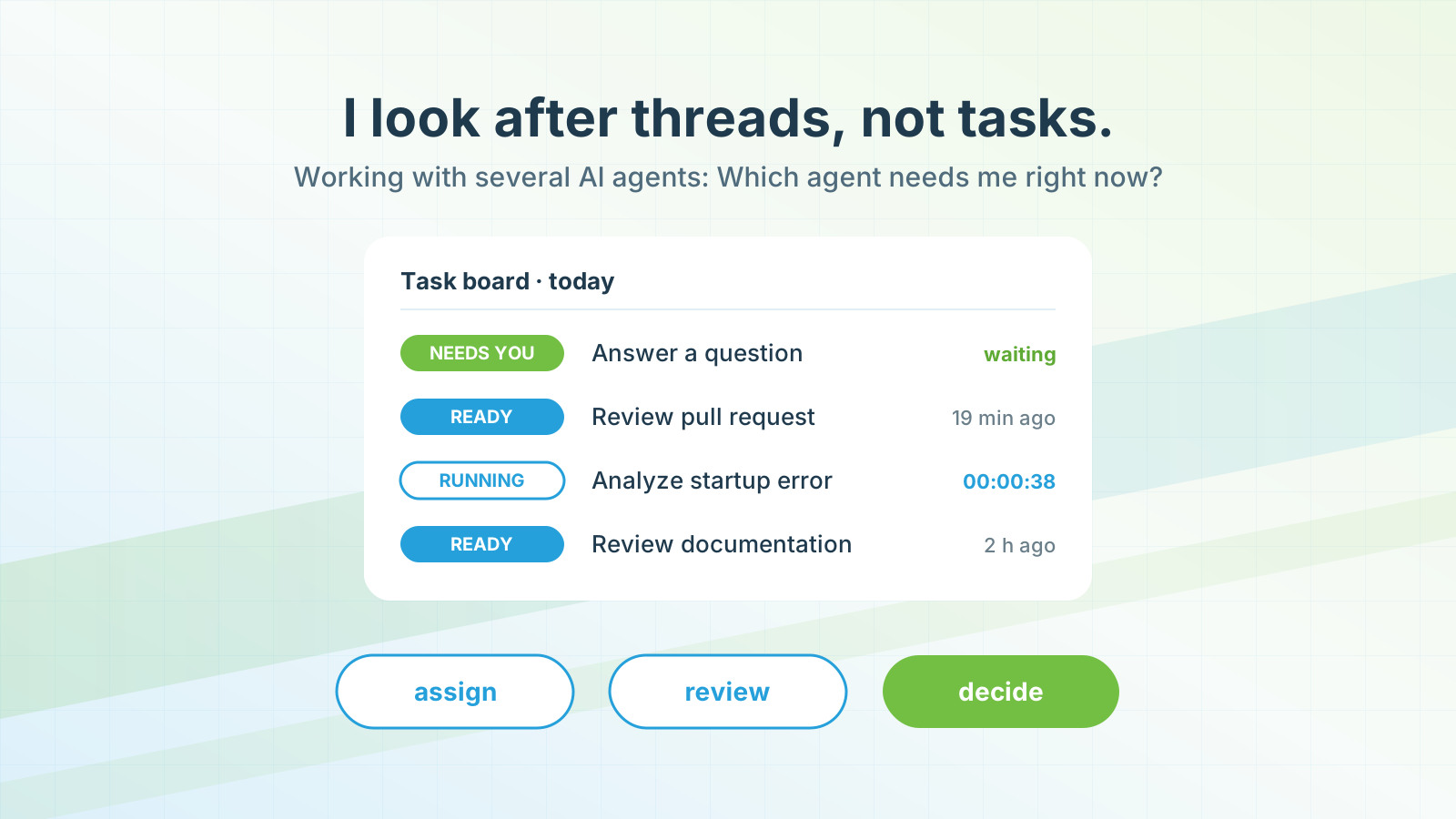
As long as I worked with one agent, keeping track was not a problem. With several AI agents in parallel, it became the bottleneck. Codex shows me my Codex chats, Claude shows me my Claude chats. Neither tool answers one question: Which agent needs me right now?
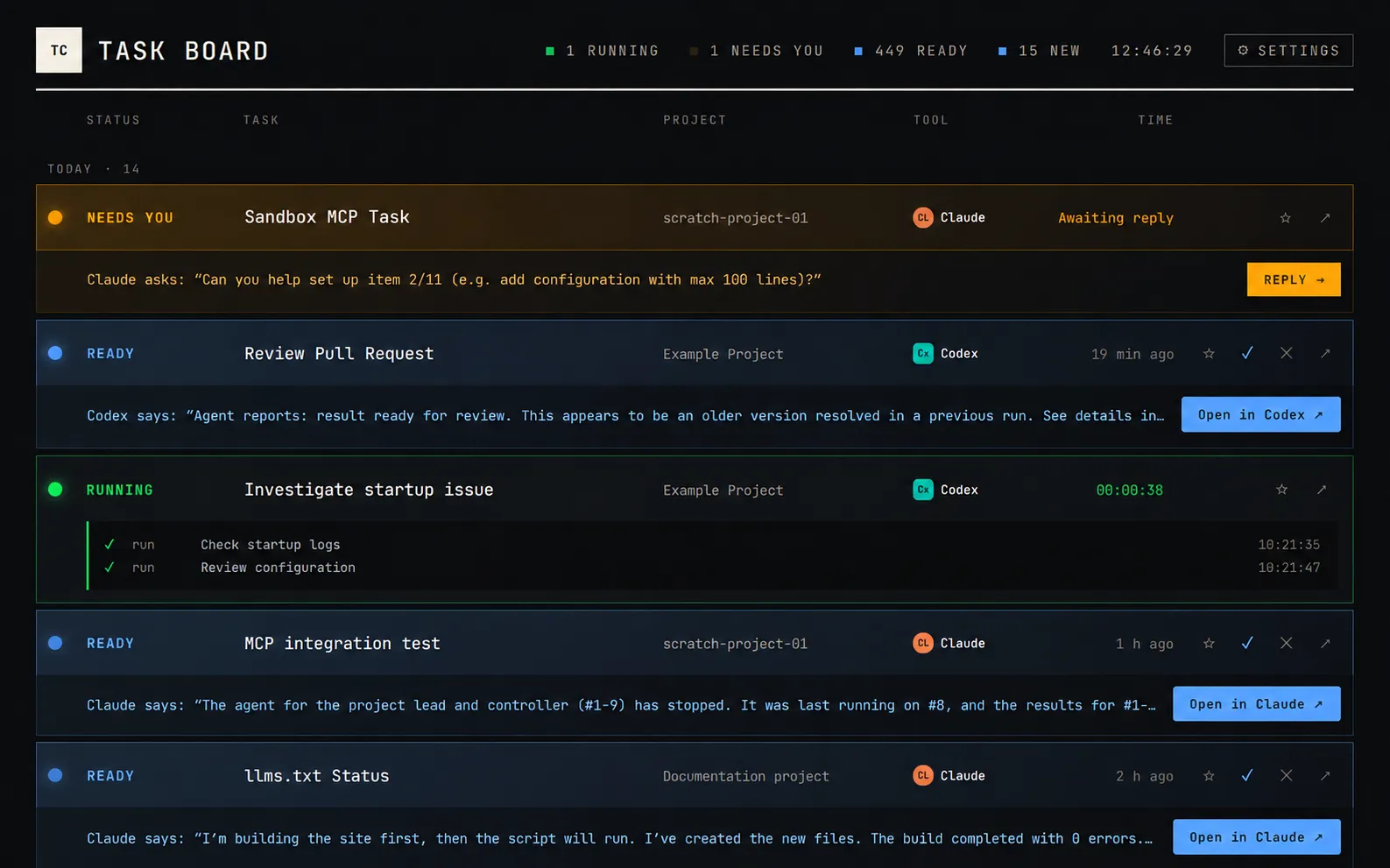
So I vibe-coded a small task board. I did not research beforehand whether something like it already existed, I simply tried out the idea. The board collects the chats from Codex and Claude in one place and shows a state for each task:
- Running: An agent is working, I do not need to do anything.
- Needs you: An agent has a question and is waiting for my answer.
- Ready: A result is ready for review.
It also shows the project, the tool and the agent’s last message. One click opens the right chat in Codex or Claude. I no longer have to search for or pin active chats.
What actually changes about the work
In my experience, three things change, and the board makes all three visible.
The agent’s working time is not a break
When an agent works on a task for twenty minutes, you do not sit there for twenty minutes and wait. You switch to the next thread. The time saved is filled again immediately. That is intended, but it noticeably increases the number of switches per day.
Getting back into context is the real work
When a result is ready, you have to read yourself back into the context: What was the assignment? Which assumptions did the agent make? What depends on this task? Getting back in takes more concentration than reading the result itself. A board that only says “something is waiting here” saves the searching, not the thinking.
Responsibility stays with the human
The agent writes code, drafts texts and runs tests. Whether the result fits the customer is decided by a human. This review work often produces no visible artifact, but it is the part the customer is paying for in the end.
What studies say about working with AI
My task board is a single case. Research does not yet measure exactly this situation, several agents across several tools. But it offers clues about the mechanisms behind it.
A six-month field study with 7,137 knowledge workers in 66 companies examined how access to a generative AI assistant affects work patterns. Employees who used the tool spent about two hours less per week on email and worked less outside regular hours. Beyond that, the authors found no change in the quantity or composition of their tasks (NBER). This shows that AI changes work measurably, but not automatically as fundamentally as it sometimes feels in your own day. Agents that take over entire tasks on their own were not part of the study.
A survey of 319 knowledge workers with 936 examples from their work reaches a finding that fits my experience well. Generative AI does not make critical thinking disappear; it shifts it towards verifying information, integrating results and taking responsibility for the task as a whole (Microsoft Research, CHI 2025). These are self-reported examples, not a time measurement.
Why getting back in is so tiring is explained by an older study without any AI connection. In two experiments, Sophie Leroy showed that thoughts about an unfinished task can persist after a switch and impair performance on the next task. She calls this “attention residue” (Leroy, 2009). This is exactly what happens when five agent tasks are open at the same time.
And finally: interruptions do not simply slow you down. In one experiment, participants even completed interrupted tasks faster and without measurable loss of quality, but reported more stress, frustration and time pressure (Mark, Gudith & Klocke, CHI 2008). If you only look at speed, you overlook the strain.
What this means for IT service providers
My board answers a personal question: Where do I need to continue next? For an IT company delivering projects for customers, there is an economic question as well: Which project and which task actually took the time?
When a working day consists of many short loops across several customer projects, this question is harder to answer in the evening than it used to be. Twenty minutes of review here, a question there, getting back into a task that has been waiting for review since yesterday. A rough entry like “Customer A, development, eight hours” no longer does the work justice. The review and decision work that shifts to the human disappears in such blocks, even though it is part of the service. I described in more detail why good time tracking becomes more important rather than less with AI in the post AI in knowledge work.
My board knows nothing about project budgets and is not supposed to. It is a tool for my attention. To find out which project the time benefits, you need project time tracking that can assign even fine-grained work cleanly.
This leads to further questions for which I do not have a finished answer yet: How do you bill the time you spend assigning, reviewing and steering agents? How do you bill the AI itself, meaning licenses and token costs? And what happens to flat fees and hourly rates when an agent does in one hour what used to take a day? These are topics for a separate post.
Tips from my practice
A few things have proven useful for me when working with several AI agents:
Make states visible. Whether with your own board or a simple list: you need to see at a glance what is running, what is waiting for you and what is done. Otherwise you spend the time saved on searching.
Answer questions first. An agent waiting for an answer blocks an entire thread. A finished result can often wait another half hour.
Fewer parallel threads than possible. Just because you can start ten agents does not mean you have to. Every open thread needs a careful review at some point, and that takes concentration.
Book time by project, not by tool. “Worked with Claude” is not a useful category. What matters is which customer and which task the work serves.
Book on the same day. Short work steps quickly lose their context. When reconstructing my day, the graphical calendar in time cockpit helps me assign the day’s work to the right projects.
Conclusion: The new work is coordination
AI agents take execution off your hands. They do not take responsibility off your hands, and they do not do the thinking for you. Instead, you coordinate several threads of work, decide more often and get back into a context more frequently. For me, that is the core of New Work with AI: not less work, but different work.
My task board solves only a small part of the problem, namely the question of where I am needed next. Whether and how well AI agents pay off economically in a company only becomes clear when you look at the projects this work benefits.
How do you keep track when several agents are working on your tasks in parallel? And do you know which projects this work benefits? If you want to try this for your team, test time cockpit with your own projects.