Customizable Time Tracking for Project Teams & Companies
Tailor time cockpit to your internal processes and create a time tracking solution that fits your business perfectly.
30 days free · no credit card · cancel any day afterwards
Customizable time tracking means that the data model, forms, lists, permissions and reports adapt to your processes instead of the other way round. In time cockpit this is done with the OnCockpitAdmin tool and IronPython scripts. Customizations live as code and can be moved between sandbox and production.
Customizable Time Tracking with time cockpit at a Glance
- Data model, forms, lists, permissions and reports
- IronPython scripts
- OnCockpitAdmin tool
- Customizations versioned as code
- Price
- €10.85 per user per month
- Trial
- 30 days free, no credit card
- Hosting
- Microsoft Azure, data centers in the EU
- Single sign-on
- Microsoft Entra ID
For IT Service Providers, Consultancies and Agencies
Companies that sell time rarely bill by the textbook. That is why time cockpit adapts to your processes and not the other way round.
IT service providers, consultancies and agencies live on billable hours, and still every company works differently: with its own service types, ticket numbers, surcharges or a check of all entries before invoicing. time cockpit’s project time tracking covers clients, projects, tasks, hourly rates and budgets out of the box. Anything beyond that you add with your own fields, lists, permissions, reports and scripts. Solvion, for example, has the system check before approval that every entry is assigned to a task.
Larger organizations test customizations in a sandbox first and sign in with single sign-on via Microsoft Entra ID; see enterprise time tracking for details. Through the MCP server for AI assistants, your employees can also query projects, budgets and time entries in Claude, ChatGPT or Copilot, with the permissions you defined in time cockpit.
Custom Fields, Forms and Workflows
With the OnCockpitAdmin, you can take control of your project time tracking system. The client allows you to customize nearly all aspects of time cockpit to suit your needs: add custom fields to the data model, adapt lists and forms, and automate workflows with scripts. Create a tailor-made time tracking system that aligns perfectly with your internal workflows.
Alternatively, we are happy to handle the customizations for you, ensuring that you receive the ideal solution for your company quickly and efficiently. What such customizations look like in practice and how much effort they took is shown in the examples from customer projects on the pricing page.
For all information regarding customization, please refer to the documentation.
Expandable Data Model
Adapt time cockpit exactly to your business requirements. You can extend data structures such as fields and tables, or create new relationships without needing to deploy a new version. Your own fields and tables are immediately available through the Web API as well. Changes to the data model are applied immediately, ensuring a seamless fit for your needs.
Flexible Permissions
Create a permission system that controls access to specific information, all without programming knowledge. time cockpit’s expression language lets you define custom access rights based on roles or rules. See more details in our permission documentation.
:Iif( 'Admin' In Set('CurrentUserRoles', 'Code'),
  :Iif(Current.UserDetail.Team.Code In Set('MyTeams'), True, False),
  False) = True
Automated Business Logic
Add custom business logic with IronPython. Leverage the full Microsoft .NET class library to integrate complex workflows directly into time cockpit – either in your preferred development environment or directly in OnCockpitAdmin. Combined with the Web API, this is how customers connect time cockpit with their own systems.
def approveVacation(actionContext):
  dc = actionContext.DataContext

  if actionContext.InputSet is not None:
    for v in actionContext.InputSet:
      v.USR_ApprovedTimestamp = DateTime.UtcNow
      v.USR_RequestForApprovalSentTimestamp = v.USR_ApprovedTimestamp
      v.USR_ApprovedBy = dc.Environment.CurrentUser.Username
      dc.SaveObject(v)
Create Custom Reports
Design reports with Microsoft Report Builder or Visual Studio, exactly as you need them. Create printouts for lists, download RDL files, and customize them with tables, charts, or other features. Reports are tied to the permission system.
Support for Multiple Languages
If you operate in multiple countries, time cockpit offers localization options for the user interface and data representation. Allow users to select their preferred language, ensuring an optimal user experience.
Infrastructure as Code
Define all customizations – from data structures to business logic – as code, making it easy to manage in version control systems. This ensures everything is documented and can be moved between your sandbox environment and your production environment.
def initialSetup(dc, model):
  comment("initialSetup", "various initial setup", messageCollector)
  sh.addDateTimeProperty(dc, model.Timesheet, "CreationDate", ...)
  sh.addDateTimeProperty(dc, model.Timesheet, "UpdateDate", ...)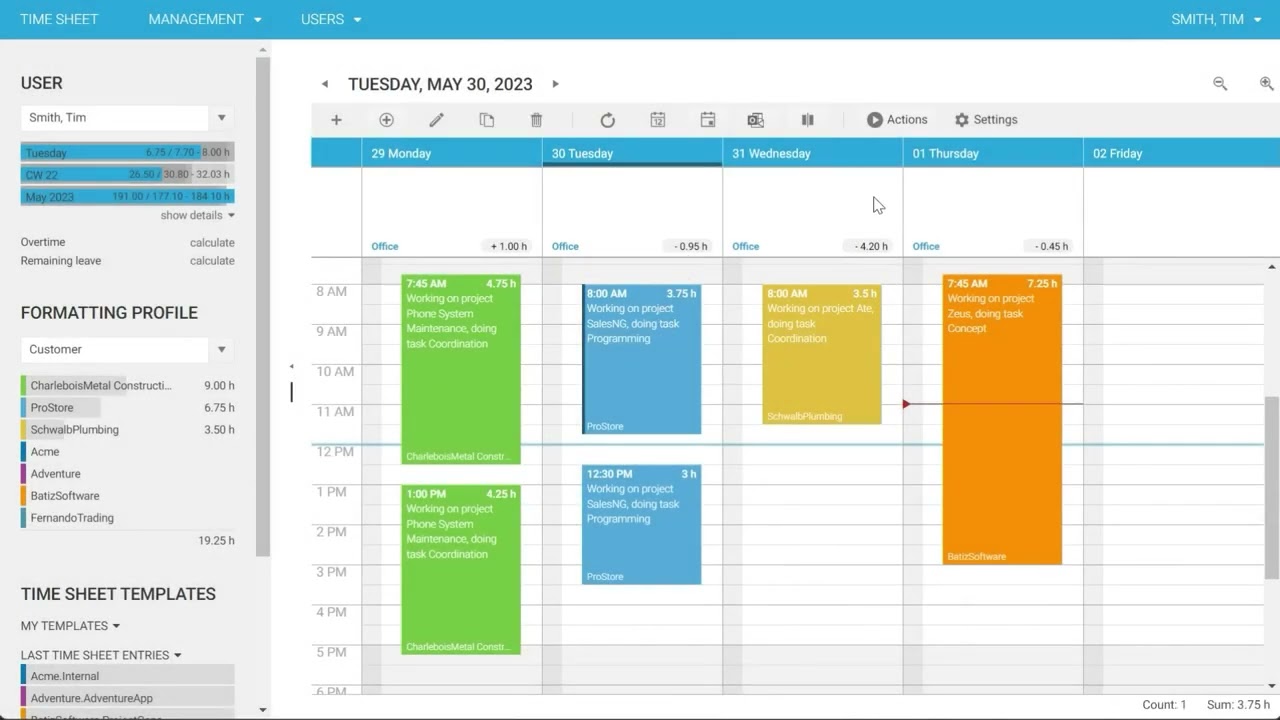
Frequently Asked Questions
What benefits does customization offer for my company?
time cockpit ships with a rich feature set, but customizing allows you to tailor time cockpit to fit your specific requirements and business processes. This means your business can work more efficiently and effectively, saving time and money in the long run. You won’t have to worry about using a system that doesn’t quite work for your company. Instead, you’ll have a system that is aligned with your company’s unique requirements. A system that grows with you.
Can I customize time cockpit myself?
Yes, you can customize time cockpit yourself using the time cockpit admin workbench. The admin workbench can be downloaded from our website, and it provides a user-friendly interface for customizing every aspect. You can customize data structures, user interface, business logic, reports, and more without the need for extensive programming knowledge. Take a look at our documentation to get started.
Can you customize time cockpit for me?
Absolutely. Our team will help you every step of the way. We’ll start by having a chat to get a feel for what you need, and then work closely with you to create a customized solution that fits your unique requirements. Once we’ve finished customizing, we’ll provide guidance and support to help you make the most of the platform.
How does the customization process work?
We like to keep it agile. The customization process is designed to be collaborative and transparent, with frequent communication and feedback to ensure that the end result meets your expectations. We’ll work with you to define the scope and goals of the customization. Once we have a clear understanding of what you’re looking for, our team will build and test the customized solution. Throughout the process, we’ll work closely with you to ensure that the customization meets your needs and requirements. You’ll get to test the customizations in a sandbox environment first so you can make sure it’s exactly what you want. Once we have received your approval after your tests, we will deploy your new features in your production environment.
How long does it typically take to customize time cockpit?
The time it takes to customize time cockpit depends on the complexity of your specific requirements. time cockpit has already done a lot of the heavy lifting in terms of development, so customizing it can typically be done faster compared to building a feature from scratch. Our team will work closely with you to understand your needs and provide you with a timeline for the customization process.
What kind of costs are associated with customizing time cockpit?
The cost of a customization depends on the scope of work. You can check our current hourly rate on our pricing page. There are no ongoing, periodic maintenance fees for the customizations made specifically for you. Any future development and maintenance will be done on an hourly basis, and in close accordance with you or your team. Customizations don’t increase your regular pricing fees.
Is there ongoing support available after the customization process is complete?
We offer ongoing support to ensure that everything runs smoothly. If you encounter any issues or have questions about your customizations, just let us know and we’ll work with you to resolve them. Our team is always happy to help and keep your time cockpit running.
What if my time cockpit is customized? Do I still get feature updates?
Absolutely! When you customize time cockpit, you’ll still have access to all the standard features of the platform. Our customization process is all about adding new functionality and tailoring the platform to your specific needs, not taking anything away from you. So, whether you’re using time cockpit out-of-the-box or have customized it to fit your unique workflows, you’ll still be able to take advantage of all the standard features we will provide in the future.
Does time cockpit fit your process, from time tracking to invoicing?
In 30 minutes you will know whether time cockpit covers your project hours, project controlling and invoicing.


- What we cover
- You tell us how you track and bill time today. We show you live how that works in time cockpit and what switching involves.
- Who you talk to
- Someone from the team that builds time cockpit and rolls it out for customers, for example Alexander or Michael.
- How
- 30 minutes online via Microsoft Teams, free and without obligation.
You pick a free slot in Microsoft Bookings (opens in a new tab) and receive the confirmation with the Teams link by email. Prefer to write? support@timecockpit.com