Employee Time Tracking Software for Austria and Germany
Your team records working hours, breaks, vacation and sick leave in one place and books the same hours straight onto clients and projects.
30 days free · no credit card · cancel any day afterwards
Booked once: counts for the project and for working time.
Employee time tracking documents the start, end and breaks of each working day, a legal requirement in Austria and Germany. time cockpit is employee time tracking software that records working hours, overtime, vacation and sick leave together with project time tracking in one tool, online in the browser on PC, Mac and mobile devices. The same hours are the basis for project invoicing.
Working Hours and Project Time in One Tool
Many companies run two systems: a time clock for working hours and a spreadsheet for projects. In time cockpit both are one entry. If you work on a client project from 9 to 11, you enter it once in the calendar. The two hours count as working time for the hours account and overtime, and at the same time as project time for budget and invoice. What this looks like on the project side is shown on the project time tracking page.
time cockpit is built for teams who mostly work at a computer, such as IT service providers, consultancies, agencies and architecture and engineering firms. It has no terminal, no time clock and no payroll; you hand the tracked hours to your payroll provider as an Excel list.
Employee Time Tracking with time cockpit at a Glance
- Working time models per employee and overtime account
- Vacation, sick leave and public holiday calendars
- Approval workflow and booking lock
- Working time limits for AT and DE
- Price
- €10.85 per user per month
- Trial
- 30 days free, no credit card
- Hosting
- Microsoft Azure, data centers in the EU
- Single sign-on
- Microsoft Entra ID
Track and Correct Working Hours
Tracking Working Hours in the Calendar
In the graphical calendar, employees enter their time by drag and drop and see their target and actual hours, vacations, time off in lieu, sick days and home office days right next to it. Recurring work without a project, such as administration, HR or marketing, goes into the calendar as a time sheet template, so this working time is recorded completely as well. How to take over Outlook appointments there is shown on the time tracking calendar page.
If you use the optional automatic time tracking with sidekick, the calendar also shows when your working day began and when you took breaks – without a time clock, even when working from home.
Working Time Models for Full-Time and Part-Time
Set the target working hours per day, for individual employees or entire teams, including part-time models with days of different length. When someone switches from full-time to part-time, the previous model stays valid for the past: time cockpit calculates every period with the model that applied at the time.
Extra work that is included in the salary is stored as an overtime allowance right in the working time model.
Time Corrections and Booking Lock
Until the booking lock, employees correct their own time in the calendar: they change the start, end or duration of an entry, add forgotten hours or delete wrong entries.
After that, time cockpit locks past months automatically. Time entries and absences in the locked period can no longer be changed, so the record of working hours stays as it was closed.
Corrections After the Booking Lock
If a change is still needed, you open the booking lock for individual employees and a defined period. Afterwards, the general lock applies again automatically.
Manage Vacation and Absences
Vacation, Time Off in Lieu and Sick Leave
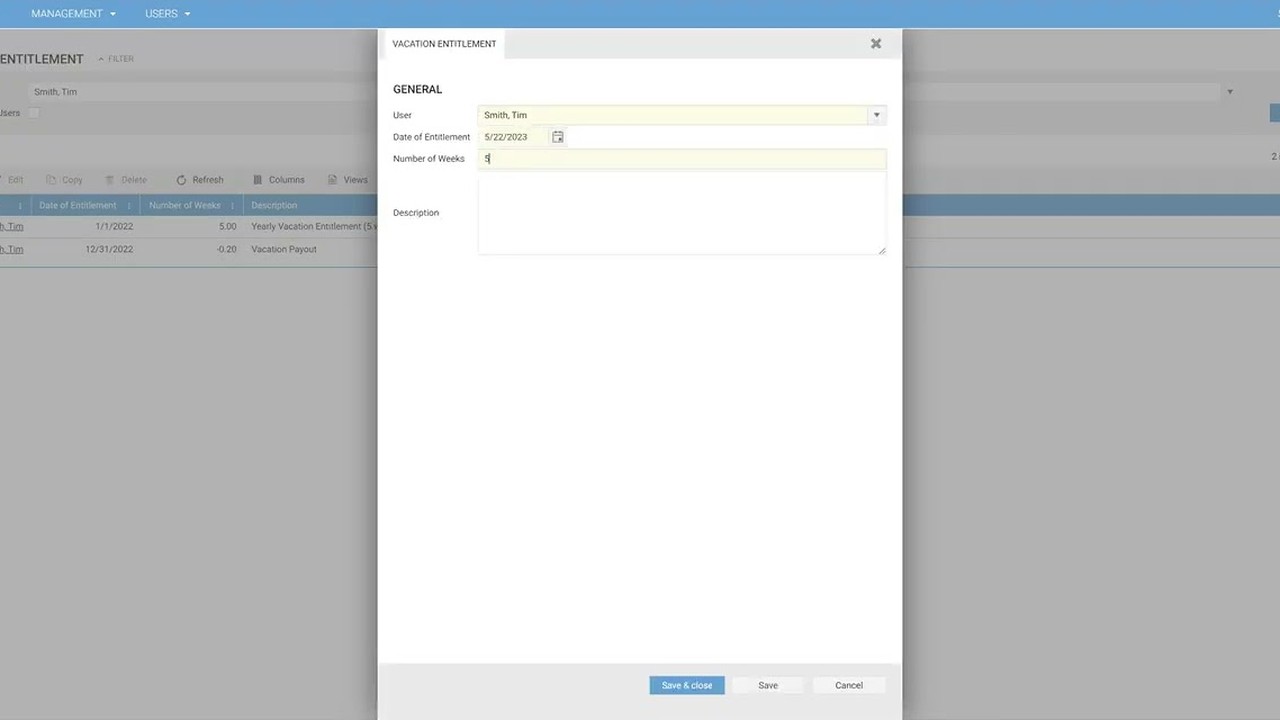
Manage vacation entitlements, vacations, time off in lieu and sick leave per employee. time cockpit calculates absences to the exact hour, using the working hours the working time model sets for that day. Vacation entitlements are kept in weeks, so the remaining vacation stays correct after a switch between full-time and part-time.
Absence Calendar and Approval
With the optional approval workflow, employees request vacation and time off in lieu and report sick leave directly in time cockpit. Managers and HR see all requests in the absence calendar and approve or reject them with one click. Everyone involved is notified automatically when a request is made and when it is decided; approved absences are binding, rejected ones are removed.
You decide per employee whether approval is needed. For everyone else, time cockpit approves absences automatically. Copying approved absences into the Outlook calendar is something we have built for customers as a custom extension.
Public Holidays and Holiday Calendars
Branches in several countries, or different public holidays per state as in Germany? In time cockpit you create holiday calendars for countries, regions or religions and assign each employee the right one. The holidays then flow automatically into target hours, the hours account and the timesheet.
Overtime, Working Time Limits and Timesheets
Overtime and Hours Account
time cockpit automatically compares tracked time with the target hours from the working time model, taking absences, public holidays and overtime allowances into account. The result is an hours account per employee, accurate to the hour. Employees see the balance, overtime and remaining vacation at all times in the calendar sidebar and on the employee dashboard.
Working Time Limits and Violations
Define the maximum hours per day or week and after how many hours a break is due. time cockpit comes with working time limits for Austria and Germany; you add your own limits for company rules.
Violations such as breaks that are too short or an exceeded daily working time are listed per date, with a link to the time entries concerned.
Digital Timesheet Instead of Excel
The timesheet shows working time, breaks, public holidays and absences for each day and whether work was done from home, which in Austria is a basis for the telework allowance. At the end it sums up remaining vacation, overtime and the home office days so far.
What time cockpit costs is on the pricing page.
Employee Time Tracking Is Mandatory in Austria and Germany
Austria
Section 26 of the Working Hours Act
Every employer records the start, end and breaks of the working time of all employees, regardless of company size and industry; only a few groups such as executive employees are exempt. Employees may record their time themselves, with the employer checking the records (§ 26 (2) AZG); for work from home, the daily working time is sufficient (§ 26 (3) AZG). Missing or deficient records are fined per employee under § 28 AZG.
Employee time tracking in Austria under § 26 AZGGermany
Federal Labour Court 2022 and ArbZG
The Federal Labour Court (Bundesarbeitsgericht, BAG) ruled on September 13, 2022 (1 ABR 22/21) that employers must record the start and end of daily working time, including overtime. The obligation follows from an EU-compliant interpretation of the Occupational Safety and Health Act (§ 3 Para. 2 No. 1 ArbSchG) and the ruling of the European Court of Justice of May 14, 2019; the BAG does not prescribe a particular form. In addition, § 16 (2) of the Working Hours Act (ArbZG) requires hours beyond eight per working day to be recorded; a reform of the ArbZG is planned. Employers remain responsible.
BMAS FAQ on working time recording (German)
We created a legal framework with a flexitime account agreement […]. Even so, labour law has to be followed very closely […]: the maximum daily working time, break rules, weekly hours and so on […]. Today all of that runs professionally with time cockpit.
Frequently Asked Questions
Is time tracking legally required in Austria and Germany?
Yes, in both countries employers have to record the working hours of their employees. In Austria, this is set out in Section 26 of the Working Hours Act (AZG). In Germany, the Federal Labour Court (BAG) ruled on September 13, 2022 that employers must record the start and end of daily working time, including overtime; the obligation follows from § 3 (2) No. 1 of the Occupational Safety and Health Act (ArbSchG). § 16 (2) of the Working Hours Act (ArbZG) additionally covers recording hours beyond eight per working day, and a reform of the ArbZG is planned.
- FAQ on working time recording (BMAS, German) bmas.de
- Austrian Working Hours Act (German) ris.bka.gv.at
Can I track working hours and project time in one tool?
Yes. In time cockpit one time entry is both: it counts as working time for the hours account and overtime and, if it is assigned to a project, as project time for budget and invoice. Time without a project, such as administration, is booked without one. More on the project time tracking page.
Is there a time clock, a terminal or a mobile app?
No. time cockpit runs in the browser, on PC and Mac as well as on tablets and smartphones. There is no terminal, no time clock and no app in the app stores. Automatic time tracking with sidekick can show when the working day began and when breaks were taken. time cockpit is therefore made for teams who mostly work at a computer.
How much does employee time tracking with time cockpit cost?
In the Business plan, €10.85 per user per month, billed to the day and cancellable daily. Teams with up to 10 users pay €29.90 for the first year in the Starter plan, and freelancers use time cockpit free of charge in the first year. You can try it for 30 days free of charge and without a credit card; all details are on the pricing page.
Does time cockpit handle payroll?
No, time cockpit is not a payroll system. Export working hours, overtime and absences as an Excel list for your payroll provider or accountant; an ongoing connection is possible via the Web API.
Why is employee time tracking software better than Excel?
In Excel you calculate overtime, vacation and public holidays with your own formulas, which have to be adjusted for every part-time switch and every new year, and every file can be changed afterwards. time cockpit calculates the hours account and remaining vacation from the working time model and holiday calendar, checks working time limits and locks closed months with the booking lock.
What is special about time tracking for part-time employees?
Part-time employees are subject to the same recording obligations as full-time employees. In time cockpit every person gets a working time model with the agreed hours per day. When someone switches between full-time and part-time, the new model applies from the effective date, and the hours account and vacation entitlement continue with it.
- Part-time employees: employment law entitlements (ÖGK, German) gesundheitskasse.at
Which working hours have to be recorded?
Daily working time, breaks, and overtime must be recorded. Deviations from the contractual working time, such as extra hours or work on Sundays and public holidays, must be documented as well.
Which time tracking methods are permitted?
No particular form is currently prescribed: time can be recorded on paper (e.g. timesheets) or electronically, and Germany does not yet have a general obligation to record electronically. According to case law, the system must be objective, reliable and accessible, so the recorded data has to be traceable.
What happens if working hours are not recorded or recorded insufficiently?
If working hours are not recorded or the records do not meet the legal requirements, fines and legal consequences may follow. In addition, employers may find themselves unable to provide evidence in disputes, particularly about overtime or break rules.
Are there special requirements for time tracking in the home office?
Yes, the documentation obligation also applies in the home office. In Austria in particular, recording home office days is important because they can be tax-privileged, for example through the telework allowance (Telearbeitspauschale, called home office allowance until 2024).
- Tax rules for telework (oesterreich.gv.at, German) oesterreich.gv.at
- FAQ on teleworking (Sozialministerium, German) sozialministerium.gv.at
What role does data protection play in time tracking?
Time tracking involves the processing of personal data and is subject to the General Data Protection Regulation (GDPR). Employers must ensure that data is processed securely and only for its intended purpose, and must inform employees about how their data is handled.
- Time tracking in the company and data protection (German) dr-datenschutz.de
What role does the works council play when introducing time tracking systems?
In Germany, the works council has a co-determination right when time tracking systems are introduced or changed, according to Section 87 (1) No. 6 of the Works Constitution Act (BetrVG). Employers therefore have to obtain the works council’s consent before implementing a new system. The situation is similar in Austria, where Section 96 of the Labour Constitution Act (ArbVG) requires consent. These rules protect the interests of employees and ensure that the systems are used fairly.
- Co-determination right, Section 87 BetrVG (German) gesetze-im-internet.de
- Rights of the works council regarding time tracking (German) personal-wissen.de
Does time cockpit fit your process, from time tracking to invoicing?
In 30 minutes you will know whether time cockpit covers your project hours, project controlling and invoicing.


- What we cover
- You tell us how you track and bill time today. We show you live how that works in time cockpit and what switching involves.
- Who you talk to
- Someone from the team that builds time cockpit and rolls it out for customers, for example Alexander or Michael.
- How
- 30 minutes online via Microsoft Teams, free and without obligation.
You pick a free slot in Microsoft Bookings (opens in a new tab) and receive the confirmation with the Teams link by email. Prefer to write? support@timecockpit.com