Time Tracking Pricing and Costs for Freelancers & Teams
One year free for freelancers, a one-time €29.90 fee in the first year for teams of up to 10 users. After that, billing is calculated on a daily basis. Full flexibility, cancel anytime.
Freelancer
after the first year €10.85 per month
Starter
after the first year €10.85 per user/month
Business
Includes personal onboarding
time cockpit costs €10.85 per user per month on the Business plan, billed by the day and cancelable any day. Teams of up to 10 users pay a one-time €29.90 for the first year on the Starter plan, and freelancers use time cockpit free for the first year. There is no setup fee, support for the standard product is included, and every plan starts with a 30-day free trial.
All Features Compared
Here’s how our plans differ in detail
| Freelancer | Starter | Business | |
|---|---|---|---|
| Number of users | 1 user | up to 10 users | unlimited users |
| Number of customers, projects, tasks, invoices, … | unlimited | unlimited | unlimited |
| Attendance time tracking | |||
| Timesheets | |||
| Project time tracking | |||
| Performance reports | |||
| Billing | |||
| Project analysis | |||
| Excel import/export | |||
| Absence management | |||
| Vacation planner | |||
| Overtime calculation | |||
| Office 365 integration | |||
Customization | |||
| Customizable user interface | |||
| Configurable permission system | |||
| Creation of custom reports | |||
| Web API for data manipulation and integration | |||
| PAT-based authentication for Web API | |||
| MCP server for AI assistants (Claude, ChatGPT, Copilot) | |||
| Automatic creation & removal of users (via API) | - | - | |
Data Center and Database | |||
| ISO27001-certified data center | |||
| Dedicated database cluster per customer | |||
| 35-day PITR (point-in-time recovery) | |||
| Free sandbox database (on request) | - | - | |
| Customer-hosted Azure databases available | - | - | |
| Direct read access to the database | - | - | |
| SSO: OAuth (e.g., AAD, OKTA) | |||
Billing | |||
| Billing | free in the first year | one-time at start | prorated at the beginning of the following month |
| Cancel anytime | |||
Support | |||
| Support | email support | email support | priority support |
| Dedicated customer success manager | - | - | from 50 users |
| Personalized onboarding | - | 1h included | 2h included |
| Custom extensions | €150/h | €150/h | €150/h |
| Ideal for freelancers and solo entrepreneurs who want to track their working hours professionally – completely free for one year and cancellable at any time. | Perfect for small businesses and teams of up to 10 users looking to get started professionally – with a minimal entry price in the first year. | For growing teams and companies that require scalability, advanced infrastructure, and priority support. |






Volume Discounts
For large teams with more than 100 users the price per user is reduced by 10% for users 101 - 200, 20% for users 201 - 300 and so on up to a maximum discount of 50%.
Users | Discount |
|---|---|
| 0 - 100 | - |
| 101 - 200 | 10% |
| 201 - 300 | 20% |
| 301 - 400 | 30% |
| 401 - 500 | 40% |
| 501 - ∞ | 50% |
Pricing Calculator
Please enter the number of users that will use time cockpit. You can increase or decrease the number anytime and your costs will be adjusted on a daily basis.
€271.25
per Month
What does time tracking with time cockpit cost?
Sample calculations for typical team sizes, at list price and with volume discounts.
| Team size | Plan | Cost per month |
|---|---|---|
| 1 person | Freelancer | free in the first year, then €10.85 |
| 10 users | Starter | one-time €29.90 for the first year, then €108.50 |
| 25 users | Business | €271.25 |
| 50 users | Business | €542.50 |
| 150 users | Business with volume discount | €1,573.25 |
The examples use the list price of €10.85 per user per month; billing is by the day, with a volume discount from the 101st user. Beyond the license there is:
- no setup fee and no upfront investment,
- no hardware: time cockpit runs in the browser on PC, Mac, Android and iOS,
- no extra charge for support of the standard product,
- customizations only if you want them, billed by effort; examples with costs follow below.
Didn't find what you are looking for?
Here are some samples of custom extensions we have built for our customers.
Office 365 Integration for Absence Times
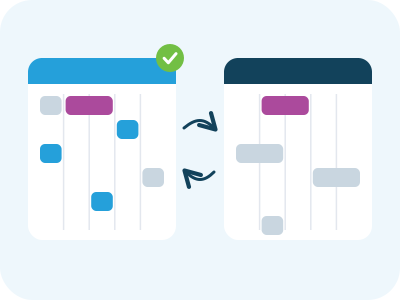
Streamline your time tracking and collaboration process! time cockpit is used as the main source for all attendance and absence-related data, and Outlook as the collaboration tool. Absence times are approved in time cockpit and added to an employees’ Outlook calendar automatically, providing an up-to-date overview of team availability. Plus, the vacation Outlook appointments are visible directly in the time cockpit calendar through our built-in Office 365 integration, ensuring a seamless experience for all time tracking needs.
Custom Approval Workflow - “From Time Tracking to Payroll”
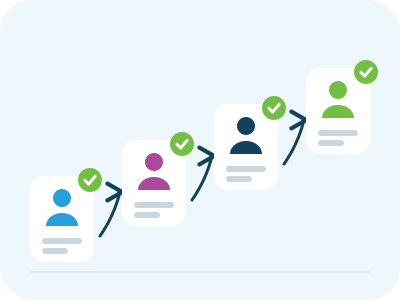
Reduce management overhead and shorten the time until invoicing! Employees approve their time sheet every month, providing project managers with the information they need for project controlling. Once the project manager approves an employee’s time sheet entries, accounting can generate the invoices. After accounting approves the invoices, HR is automatically notified to trigger payroll processes.
Freshdesk Integration
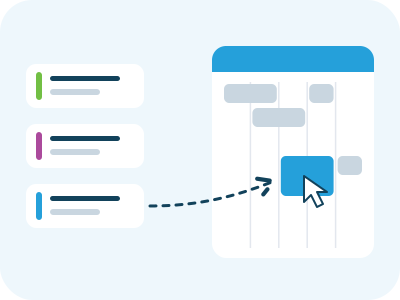
Integrate your ticketing system and increase accuracy! With a custom integration of Freshdesk into time cockpit using webhooks, time tracing on tickets is drastically reduced. Whenever a new ticket is created or updated, the changes are automatically pushed to time cockpit. With time cockpit’s template queries, the Freshdesk tickets are directly displayed in the time sheet calendar, allowing employees to easily convert them into time sheet entries by simply dragging and dropping.
Working Time Violation Notification
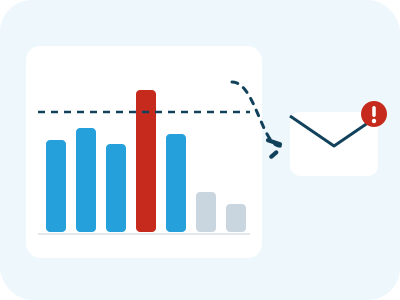
Keep your employees healthy and your business compliant! With its ability to check time sheet entries against a customized rule set, employees are automatically notified every second day via email about any unbooked time, missing break times, or excessive working hours. This promotes early detection of incomplete time recording and helps avoid potential legal violations. If violations persist, managers can take organizational measures, such as balance workload between teams or individuals.
time cockpit at a glance
- Product
- time cockpit, project and employee time tracking as software-as-a-service
- Vendor
- software architects gmbh, Leonding (Austria), time cockpit since 2010
- Hosting
- Microsoft Azure, data centers in the EU (Amsterdam and Dublin), dedicated database per customer, 35-day point-in-time recovery
- Price
- €10.85 per user per month; Freelancer plan free in the first year; Starter €29.90 in the first year for up to 10 users
- Trial
- 30 days free, no credit card, cancel any day afterwards
- Master data
- Unlimited clients, projects, tasks and invoices
- Platforms
- Browser on PC, Mac, Android and iOS; Activity Tracker for Windows
- Integrations
- Web API (REST, OData, TCQL) with personal access tokens, MCP server for AI assistants, Excel import and export, Office 365 appointments in the calendar
- Single sign-on
- Microsoft Entra ID (Azure AD)
Frequently asked questions about pricing
Which plans does time cockpit offer?
time cockpit offers three plans designed for different needs:
- Freelancer
For sole proprietors and self-employed professionals with a single user. - Starter
For small teams with up to 10 users. - Business
For larger and growing teams with an unlimited number of users, including additional onboarding and extended support.
All plans include the full time tracking feature set; a few enterprise services such as the sandbox database, customer-hosted database, direct database access and user provisioning via API are reserved for the Business plan. The remaining differences lie in the number of users and the level of additional services provided.
Is time cockpit free?
There is no permanently free plan. Freelancers use time cockpit free for the first year, after that it costs €10.85 per month; a payment method is required once the trial ends. Everyone else tries time cockpit free for 30 days without a credit card. More in the post An overview of the time cockpit pricing model.
How long can I try time cockpit for free?
You can try time cockpit free of charge for 30 days. No credit card is required, and no further action is necessary if you decide not to continue using time cockpit after the trial period. You can test all features of time cockpit with an unlimited number of users.
Do I need to provide a credit card for the trial period?
No. No credit card is required for the 30-day trial period.
Please note, however: After the trial period ends, a valid payment method (e.g. a credit card) must be provided even for the Freelancer plan.
If no payment method is provided, the account will be automatically deleted after 30 days.
What are the payment options?
Enter your billing information any time during the trial period. Billing starts not until your trial period is over. The first 30 days are always free.
We accept Mastercard, Visa, American Express and SEPA. All payments are processed via Stripe - we do not receive or store your credit card data. If you would like to pay per invoice, please contact us at support@timecockpit.com.
Is any upfront investment required?
No, there are no upfront investments required. Create an account and start using time cockpit today. As your team or organization grows, you can simply add additional users without having to worry about additional investments like software licenses or servers. If you want us to tailor time cockpit to your exact needs please refer to support time on the pricing page.
Are there any additional fees for using time cockpit, such as setup or support?
No, there is no additional fee for technical support for the off-the-shelf product. Just drop us a mail at support@timecockpit.com and we get back to you as soon as possible. If you want us to tailor time cockpit to your exact needs please refer to support time on the pricing page.
What if you customized time cockpit for my business? Does it impact license fees?
No, you will still pay the same monthly fee as those who use the standard software, and you will also benefitf from most improvements made to the software. However, maintenance for any features that are implemented or customized specifically for your business may be charged separately. Please refer to support time on our pricing page for more information.
How do I get my invoices?
At the end of each month you will receive your invoice per email with a detailed listing of your actual usage. Additionally you find a history of your invoices in the web portal.
How long is the cancellation period?
There is no cancellation period. Cancel your account at any time. At the end of the month you will receive your last invoice. You will only be charged for the number of days from the first of month until your date of termination.
Are there any limitations or restrictions on the features available or a limit on the number of projects or tasks I can manage with time cockpit?
No, but we believe in fair use. We want to ensure that all users have a positive experience while using the software. Under the fair use policy, users are expected to use the software in a reasonable and responsible manner. This includes avoiding excessive usage that may negatively impact the performance of the system or interfere with the ability of other users to access the software. In the event that a user exceeds the fair use policy, time cockpit reserves the right to take appropriate action, which may include restricting access to the software.
Are there any additional fees for accessing time cockpit from multiple devices or locations?
No, there are no additional fees for accessing time cockpit from multiple devices or locations. As long as you have an internet connection, you can access time cockpit from any device or location. This allows for greater flexibility and convenience, particularly for users who need to work remotely or across multiple locations.
Does time cockpit fit your process, from time tracking to invoicing?
In 30 minutes you will know whether time cockpit covers your project hours, project controlling and invoicing.


- What we cover
- You tell us how you track and bill time today. We show you live how that works in time cockpit and what switching involves.
- Who you talk to
- Someone from the team that builds time cockpit and rolls it out for customers, for example Alexander or Michael.
- How
- 30 minutes online via Microsoft Teams, free and without obligation.
You pick a free slot in Microsoft Bookings (opens in a new tab) and receive the confirmation with the Teams link by email. Prefer to write? support@timecockpit.com